DevOps
Cloudflare Tunnel to Docker Containers by Name: No Open Ports, No UFW Rules
Why localhost:PORT gives a 502 when cloudflared runs in Docker, and the pattern that fixes it for every app on the box: one shared Docker network, routes to container names, nothing published, nothing to firewall. With the trade-offs and the traps.
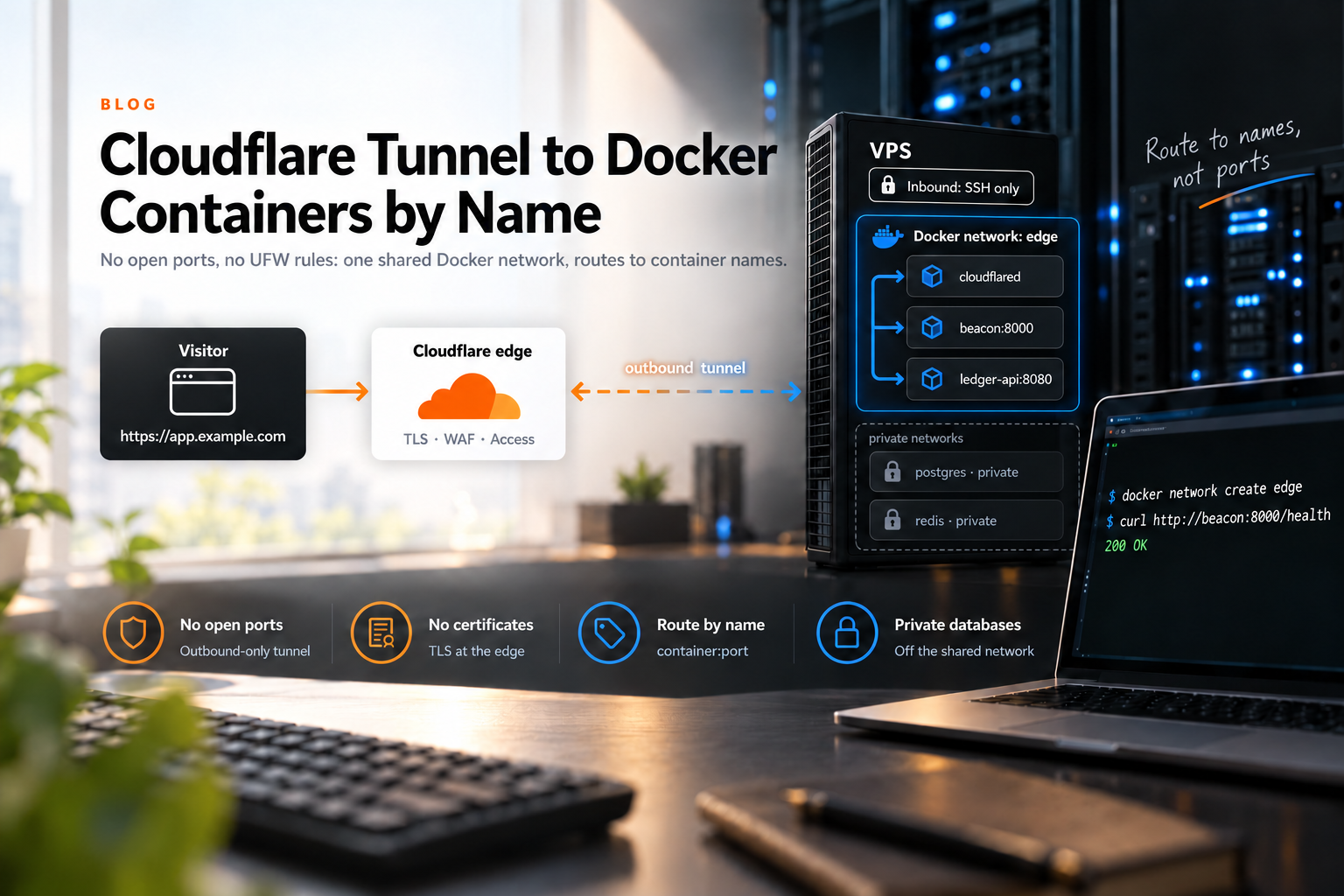
The setup looks finished: a VPS runs a few apps in Docker, a cloudflared container keeps a tunnel open to Cloudflare, and you add a public hostname that points to localhost:8080. You open the subdomain and get 502 Bad Gateway.
Nothing is wrong with the app. curl localhost:8080 on the server works. The tunnel is "Healthy". The problem is one word: localhost. Inside the cloudflared container, localhost is the cloudflared container.
This post is the pattern I now use for every app on a server like that: put the tunnel and the app on one shared Docker network and route to the container by name. No published ports, no nginx vhost, no certbot, and no UFW rule per app. The sample apps are fictional: Beacon, an internal dashboard on port 8000, and ledger-api, a JSON API on port 8080.
What this post is not
cloudflared or creating your first tunnel, and it does not cover quick tunnels (trycloudflare.com). It assumes a named tunnel already runs as a Docker container on the server. If cloudflared runs as a systemd service on the host, localhost:PORT does work, and most of this post becomes optional.Why localhost:PORT fails#
Every container has its own network namespace: its own interfaces, its own routing table, its own 127.0.0.1. Publishing -p 8080:8080 makes the app reachable on the host's loopback. It does nothing for the loopback inside another container.
Loading diagram…
Diagram source
flowchart LR
  accTitle: Why localhost fails from inside the cloudflared container
  accDescr: The tunnel container resolves localhost to itself, where nothing listens on port 8080, so Cloudflare returns 502. The app is reachable on the host's loopback through the published port, but the tunnel container never looks there.

  edge["Cloudflare edge"] -->|"route: http://localhost:8080"| cf
  subgraph host["VPS host: 127.0.0.1:8080 is published here"]
    subgraph cfns["cloudflared container"]
      cf["cloudflared"] -->|"localhost = this container"| nothing["Nothing listens on 8080: 502"]
    end
    subgraph appns["ledger-api container"]
      app["App on 0.0.0.0:8080"]
    end
  end
The tempting fixes all trade one problem for another:
network_mode: hoston cloudflared makeslocalhostmean the host again, but the tunnel container now shares the host's whole network stack, and every app must publish a port on the host.host.docker.internalis not defined on Linux unless you addextra_hosts: ["host.docker.internal:host-gateway"], and it still requires published ports.- The container's IP address (
172.18.0.5) changes whenever the container is recreated.
Docker already ships the right tool: user-defined networks with built-in DNS. On a user-defined network, every container can reach every other container on it by name.
The pattern#
Loading diagram…
Diagram source
flowchart TD
  accTitle: Cloudflare Tunnel routing to containers on a shared Docker network
  accDescr: Visitors reach Cloudflare over HTTPS. The cloudflared container holds an outbound-only connection to Cloudflare and forwards each hostname to a container name on the shared edge network. Databases stay on each app's private network. No port on the VPS is open to the internet except SSH.

  browser["Visitor: https://beacon.example.com"] --> cfedge["Cloudflare edge: TLS, WAF, Access"]
  cfedge <-->|"Outbound tunnel, started by the VPS"| cloudflared

  subgraph vps["VPS: inbound firewall allows SSH only"]
    subgraph edgenet["Docker network: edge"]
      cloudflared["cloudflared"]
      beacon["beacon, port 8000"]
      ledger["ledger-api, port 8080"]
    end
    subgraph beaconnet["beacon_default: private"]
      beacondb["postgres"]
    end
    subgraph ledgernet["ledger_default: private"]
      ledgerdb["redis"]
    end
    cloudflared -->|"beacon.example.com"| beacon
    cloudflared -->|"api.example.com"| ledger
    beacon --> beacondb
    ledger --> ledgerdb
  end
Four rules make it work:
- One external network, created once, named something boring like
edge. cloudflaredjoins it, and so does the one front container of each app (the web or API process).- Databases, caches and workers never join it. They stay on the app's own private
defaultnetwork. - Each tunnel route targets
container-name:internal-port, likehttp://beacon:8000. Never the host port.
And here is what happens on a request:
Loading diagram…
Diagram source
sequenceDiagram
  accTitle: One request through the tunnel
  accDescr: The cloudflared container opened an outbound connection at startup. A visitor's HTTPS request reaches Cloudflare, which sends it down that connection. cloudflared resolves the container name through Docker's embedded DNS and forwards plain HTTP inside the edge network.

  participant V as Visitor
  participant E as Cloudflare edge
  participant C as cloudflared
  participant D as Docker DNS 127.0.0.11
  participant B as beacon

  C->>E: Outbound connection at startup, no inbound port
  V->>E: GET https://beacon.example.com
  E->>C: Request for beacon.example.com, over the tunnel
  C->>D: Resolve "beacon"
  D-->>C: 172.20.0.4, on the edge network
  C->>B: GET http://beacon:8000/
  B-->>C: 200 OK
  C-->>E: Response
  E-->>V: Response over HTTPS
Step 1: create the shared network once#
docker network create edgeCreate it by hand, outside any Compose project, and declare it external: true everywhere, including in the tunnel's own Compose file. If one project "owns" the network, docker compose down in that folder tries to delete it while other containers still use it, and a fresh server needs that project started first.
Already running? Find the network it is on
cloudflared already runs from a Compose file, it is on that project's default network, named <folder>_default. You can keep that name and skip creating edge. If the answer is bridge, you must move to a user-defined network: the default bridge network has no name resolution between containers.Ask Docker instead of guessing:
docker inspect cloudflared --format '{{range $k, $v := .NetworkSettings.Networks}}{{$k}} {{end}}'Step 2: the tunnel stack#
# /srv/apps/tunnel/docker-compose.yml
services:
  cloudflared:
    image: cloudflare/cloudflared:2024.12.2   # pin a version, not :latest
    container_name: cloudflared
    command: tunnel --no-autoupdate run
    environment:
      TUNNEL_TOKEN: ${TUNNEL_TOKEN}           # from .env, chmod 600
    restart: unless-stopped
    networks: [edge]

networks:
  edge:
    external: true
The token mode keeps routing in the Cloudflare dashboard (a "remotely managed" tunnel). The container only needs outbound HTTPS. It never listens on a port of the host.
Step 3: each app joins edge with its front container only#
# /srv/apps/beacon/docker-compose.yml
services:
  web:
    image: ghcr.io/you/beacon:1.4.0
    container_name: beacon          # the name the tunnel routes to: unique on the server
    command: uvicorn app.main:app --host 0.0.0.0 --port 8000
    expose: ["8000"]                # documentation only: nothing is published
    networks: [default, edge]
    depends_on: [db]

  db:
    image: postgres:16
    networks: [default]             # never on edge

networks:
  edge:
    external: true
Listen on 0.0.0.0 inside the container
127.0.0.1 inside its container is unreachable from every other container, tunnel included. The symptom is connection refused even though name resolution works. Uvicorn and Gunicorn need --host 0.0.0.0 (or -b 0.0.0.0:8000), Next.js standalone needs HOSTNAME=0.0.0.0, and Vite preview needs --host.Keep local development untouched with an override file#
On a laptop there is no edge network, and external: true makes docker compose up fail with network edge not found. Keep the base file portable and add the network only on the server, in docker-compose.override.yml, which Compose merges automatically when it exists:
# docker-compose.override.yml — on the server only (listed in .gitignore)
services:
  web:
    networks: [default, edge]

networks:
  edge:
    external: true
    name: edge
Commit a docker-compose.override.example.yml with a placeholder and the command that finds the right name. On a new server: copy it, replace the placeholder, docker compose up -d.
Replace the placeholder, literally
network NETWORK_NAME not found or network CHANGE_ME not found is not a Docker bug. It is the example value that never got replaced. Read the merged result before starting anything.docker compose config | grep -A3 '^networks:'Step 4: point the hostname at the container#
In Cloudflare Zero Trust: Networks → Tunnels → your tunnel → Public Hostname (newer dashboards call these published application routes):
| Field | Value |
|---|---|
| Subdomain | beacon |
| Domain | example.com |
| Type | HTTP |
| URL | beacon:8000 |
Cloudflare creates the DNS record for you. No A record points to the VPS, so the origin IP never appears in DNS.
Two details that cost me time:
- The port is the one inside the container (
8000). A published127.0.0.1:18000:8000mapping is irrelevant to the tunnel. - Use
HTTP, notHTTPS. TLS ends at Cloudflare's edge, and the hop fromcloudflaredto the container stays inside the Docker network. PointingHTTPSat an app with a self-signed certificate needsNo TLS Verify, which buys nothing on a private bridge.
Step 5: test from inside the network, not from the host#
curl localhost:8000 on the host proves the wrong thing. Test exactly what cloudflared will do: resolve the name from the edge network.
# who is on the network?
docker network inspect edge --format '{{range .Containers}}{{.Name}} {{end}}'

# the same request the tunnel will make: expect 200
docker run --rm --network edge curlimages/curl:8.10.1 \
  -sS -o /dev/null -w '%{http_code}\n' http://beacon:8000/health
The official cloudflared image is distroless: there is no shell, no curl, no wget to docker exec into. A throwaway curl container on the same network is the closest thing.
What the server looks like#
- /srv/apps/
- tunnel/
- docker-compose.ymlcloudflared only, joins edge
- .envTUNNEL_TOKEN, chmod 600
- beacon/
- docker-compose.ymlportable: works on a laptop as is
- docker-compose.override.ymlserver only: joins edge
- docker-compose.override.example.ymlcommitted template
- .envapp secrets, chmod 600
- ledger-api/
- docker-compose.yml
- docker-compose.override.ymljoins edge as ledger-api
- .env
Adding the next app is three steps: give its front container a unique container_name, add the override, add a route. No firewall change, no certificate, no vhost.
UFW: why you do not need a rule per app#
With this pattern the inbound firewall policy is short, and it does not grow with every new app:
sudo ufw default deny incoming
sudo ufw default allow outgoing
sudo ufw allow OpenSSH
sudo ufw enable
Nothing else. The tunnel is an outbound connection, and outbound is allowed. Apps publish no ports, so there is nothing to open, and nothing to forget to close.
UFW does not protect published Docker ports
iptables rules for -p 8080:8080, and they run before UFW's. A container published on 0.0.0.0 is reachable from the internet even with ufw deny 8080. Many servers that "only allow SSH" quietly expose every published port. Publishing nothing is the simplest fix; binding to 127.0.0.1:PORT:PORT is the next best.If you still want a port for debugging over SSH, publish it on loopback only:
ports:
  - "127.0.0.1:18000:8000"   # reachable with an SSH tunnel, never from the internet
Pros and cons#
What you gain:
- No inbound ports besides SSH, so no port scans to answer, and no Docker-vs-UFW surprises.
- The origin IP stays hidden: DNS points to Cloudflare, and the server never accepts direct web traffic.
- No certificates on the server: no certbot, no renewal cron, no expired-certificate weekend.
- Works behind NAT or CGNAT, and on hosts with no public IP at all.
- Routing is per hostname, per container, so adding an app is a dashboard entry and a Compose override.
- Cloudflare Access can put a login (email code, Google, GitHub) in front of an admin tool without touching its code.
What you give up:
- Cloudflare becomes a hard dependency. If the tunnel or your account has a bad day, every app behind it does too.
- TLS ends at Cloudflare, which sees request and response bodies in clear text. That is fine for most sites, and a real decision for sensitive data.
- Plan limits apply: request bodies are capped (100 MB on the Free and Pro plans), and a response that takes longer than about 100 seconds becomes a
524. Large uploads and long reports need a different path. - Routes live in a dashboard, not in your repository, unless you switch to a locally managed tunnel (below).
- The shared network is a shared blast radius: every container on
edgecan reach every other container onedge. That is why databases must stay off it. - One
cloudflaredcontainer is a single point of failure for every app. - Visitor IPs arrive in headers: the app sees the
cloudflaredcontainer as its client and must readCF-Connecting-IP.
Compared with the alternatives#
| Tunnel + shared network | Published port + host nginx + certbot | cloudflared on the host + localhost | network_mode: host | |
|---|---|---|---|---|
| Inbound ports on the VPS | SSH only | 80, 443, SSH | SSH only | SSH only |
| Firewall rules per app | None | None, but Docker bypasses UFW for published ports | None | None |
| TLS certificates on the server | None | One per domain, renewed | None | None |
| Origin IP in public DNS | No | Yes | No | No |
| App needs a published port | No | Yes, on loopback | Yes, on loopback | Yes, on the host |
| Container isolation | Per network | Per network | Per network | cloudflared shares the host stack |
| Works without Cloudflare | No | Yes | No | No |
For a server that already runs cloudflared in Docker and hosts several small apps, the shared network wins on every row except the last.
Best practices#
- Name the network once and keep it stable.
edge, created by hand,external: truein every Compose file, cloudflared's included. - Join only front containers. Web and API processes, never Postgres, Redis, or workers.
- Give every routed container a unique name, with
container_nameor a network alias. Service names likeweb,app, orapiexist in many projects, and on a shared network Docker DNS answers a duplicate name with all matching containers, alternating between them. - Route to
name:internal-portoverHTTP. Never to a host port, never tolocalhost. - Publish nothing, or
127.0.0.1only for debugging. - Pin the
cloudflaredimage and run two replicas (two services with the same token) if downtime matters: the tunnel spreads connections across them. - Treat the tunnel token like a password. It lives in
.envwithchmod 600. Anyone who has it can run your tunnel. Rotate it if it leaks. - Use Cloudflare Access for anything administrative. A dashboard behind an email-code policy is far harder to brute-force than a login form alone.
- Trust proxy headers only from the tunnel. With nothing published, every request comes through
cloudflared, so readingCF-Connecting-IPandX-Forwarded-Protois safe. Publish the app port on0.0.0.0and anyone can forge them. - Test from the
edgenetwork, with a throwaway container, before blaming Cloudflare.
Want the routes in git? Use a locally managed tunnel#
The dashboard is convenient. If you would rather review routes in a pull request, run the tunnel from a config file with ingress rules instead of a token:
# /srv/apps/tunnel/config.yml
tunnel: 6ff42ae2-765d-4adf-8112-31c55c1551ef   # your tunnel UUID
credentials-file: /etc/cloudflared/6ff42ae2-765d-4adf-8112-31c55c1551ef.json
ingress:
  - hostname: beacon.example.com
    service: http://beacon:8000
  - hostname: api.example.com
    service: http://ledger-api:8080
  - service: http_status:404   # required catch-all
The trade: you now manage the credentials file, and DNS records are created with cloudflared tunnel route dns <tunnel> <hostname> instead of automatically.
A field guide to errors you will actually see#
| Symptom | Likely cause |
|---|---|
502 Bad Gateway, route localhost:PORT | localhost is the cloudflared container itself |
502, route name:PORT | Not on the same network, or the host port used instead of the container port |
network X not found on docker compose up | Placeholder never replaced, or wrong <folder>_default name |
no such host in the cloudflared logs | Container on the default bridge network, or a typo in the name |
connection refused while the name resolves | The app binds 127.0.0.1 inside its container |
| Requests randomly hit the wrong app | Two projects expose the same service name on edge |
Worked yesterday, 502 after a redeploy | Network attached with docker network connect instead of in Compose, lost on recreate |
ERR_TOO_MANY_REDIRECTS | The app forces HTTPS but ignores X-Forwarded-Proto |
Every visitor logged as 172.x.x.x | The app logs the socket peer instead of CF-Connecting-IP |
413 Payload Too Large | Upload above the plan's request body limit |
524 on a slow report | Response took longer than Cloudflare's timeout |
| The site works over the server's public IP | A port is still published on 0.0.0.0: remove it |
What I do on a new server now#
- SSH keys only, password login off, UFW allowing OpenSSH only.
docker network create edge.- Start the tunnel stack with a pinned image, its token in
.env. - For each app: unique container name, front container on
edge, no published ports, databases on the private network. - Test with
curlimages/curlonedge, then add the routename:internal-port. - Put Cloudflare Access in front of anything with an admin page.
The pattern is boring once it is in place: one network, one container that dials out, and routes that read like a list of names. The un-boring part is always the same short list: localhost that means the wrong machine, a host port where the container port belongs, a placeholder nobody replaced, and a database that ended up on the shared network.
If you steal one habit from this post, steal this one: route to names, not to ports, and publish nothing you do not have to.
Related posts
Secure CI/CD from GitHub Actions to a VPS: Docker, GHCR, nginx, and the Traps
A production field guide: GitHub Actions builds a Django API image, pushes it to GHCR, and deploys it over SSH onto a VPS that already hosts other sites. Secrets, Compose interpolation, TLS redirect loops, and the mistakes that take a weekend.
Sep 30, 2026 · 14 min read
Docker Best Practices for 2024
Essential Docker tips and best practices for building secure, efficient, and maintainable container images.
Jan 5, 2024 · 4 min read